Repeating
repeat() re-applies a modeling feature at multiple positions. Unlike copy(), which duplicates the finished shape, repeat() re-runs the operation — so the feature interacts with the solid at each new location just as if you had written it there by hand.
When to use repeat vs. copy
Think of it this way:
copy()takes a snapshot of the shape and stamps it at new positions. The copies are independent clones of the finished geometry.repeat()takes a feature (like a cut or extrude) and re-applies it at new positions. Each repetition cuts into, extrudes from, or otherwise modifies the existing solid.
This distinction matters most with operations like cut(). If you cut a pocket and then copy() the result, you get clones of the entire solid (each with one pocket). If you cut a pocket and then repeat() the cut, you get one solid with multiple pockets.
// ❌ copy() clones the whole shape — you get separate solids with one pocket each
cut(15)
copy("linear", "x", { count: 4, offset: 40 })

// ✅ repeat() re-applies the cut — you get one solid with 4 pockets
const c = cut(15)
repeat("linear", "x", { count: 4, offset: 40 }, c)
Linear repeat
Repeat a feature along one or more axes:
import { sketch, extrude, cut, repeat, move, rect } from 'fluidcad/core';

sketch("xy", () => {
    rect(300, 104).centered()
})

const tray = extrude(50)

sketch(tray.endFaces(), () => {
    move([-143, -45])
    rect(30, 40)
})

const c = cut(15)

repeat("linear", ["x", "y"], {
    count: [7, 2],
    length: [255, 50]
}, c)
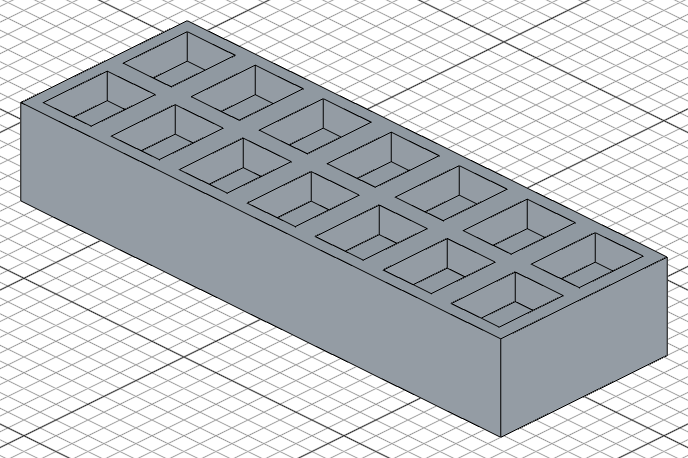
The last argument is the feature to repeat — the return value from extrude(), cut(), fillet(), etc.
Options:
count— number of repetitions per axis (including the original)length— total span to distribute across (evenly spaced)offset— explicit spacing between repetitions (alternative tolength)centered— whentrue, centers the pattern around the original object's position. For example,count: 3withcenteredplaces one instance on each side of the original.skip— array of index tuples to skip. For a single axis, use[[1], [3]]to skip the 2nd and 4th instances. For multi-axis grids, use[[1, 2]]to skip a specific grid position.
Use length when you know the total distance and want even spacing. Use offset when you know the exact spacing you want.
Circular repeat
Repeat a feature around an axis:
repeat("circular", "z", {
    count: 6,
    angle: 360
}, e)
Options:
count— number of repetitions (including the original)angle— total angle to spread acrossoffset— explicit angle between each repetition (alternative toangle)centered— whentrue, centers the pattern around the original object's positionskip— array of indices to skip (e.g.[2, 4]to skip the 3rd and 5th instances)
Mirror repeat
Repeat a feature mirrored across a plane:
const e = extrude(20)
repeat("mirror", "front", e)   // mirror the extrude across the front plane
This re-applies the feature on the other side of the plane — useful for building symmetric models where you only need to define one half.
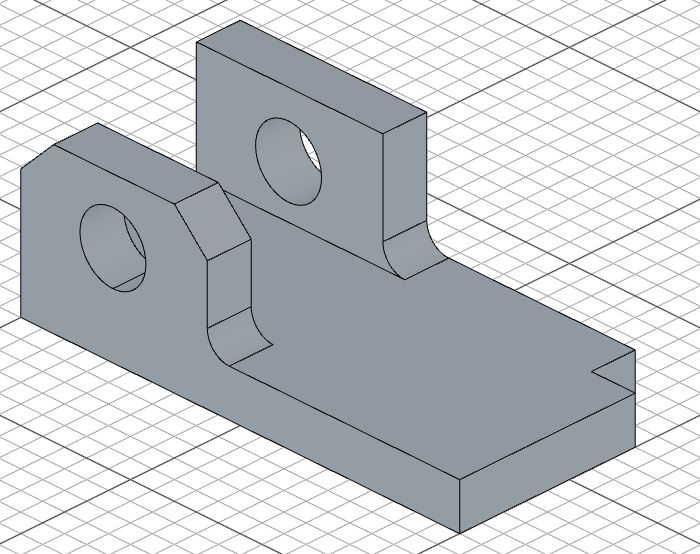
You can pass multiple features to mirror them all at once. Only the features you pass are mirrored — anything else stays as-is:
import { chamfer, cut, extrude, fillet, plane, repeat, select, sketch } from 'fluidcad/core';
import { edge, } from 'fluidcad/filters';
import { circle, move, rect } from 'fluidcad/core';

sketch(plane("xy"), () => {
    rect(200,100).centered();
})

const e1 = extrude(20)

sketch(e1.endFaces(), () => {
    move([100-20, 50 - 20])
    rect(20, 20)
})

cut()

sketch(e1.endFaces(), () => {
    move([-100, -50])
    rect(85, 20)
})

const e2 = extrude(50);

sketch(e2.sideFaces(3), () => {
    move([-58, 85/2])
    circle(30)
})

const c1 = cut(20)
select(edge().onPlane("top", 20+50).parallelTo("yz"))

chamfer(15)
select(edge().onPlane("top", 20).onPlane("yz", -15))

const f2 = fillet(10)

repeat("mirror", "front", e2, c1, f2); // repeat the extrusion, cut and fillet but not the chamfer
Rotate repeat
Create a rotated clone of a feature around an axis:
const e = extrude(10)
repeat("rotate", "z", 45, e)   // rotate 45° around the Z axis
The angle defaults to 90° if omitted:
repeat("rotate", "z", e) // rotate 90° around Z
Matrix repeat
For arbitrary transformations, pass a Matrix4 directly:
import { Matrix4 } from 'fluidcad/math';

const m = Matrix4.fromTranslation(10, 0, 5).multiply(
    Matrix4.fromRotationZ(Math.PI / 6)
)
repeat(m, e)                   // apply a combined translation + rotation
This is useful when you need a transformation that doesn't fit the linear, circular, mirror, or rotate presets.
Example: ice cube tray pockets
Cut one pocket, then repeat it across a grid:
import { sketch, extrude, cut, repeat, move, rect } from 'fluidcad/core';

sketch("xy", () => {
    rect(300, 104).centered()
})

const tray = extrude(50)

// One pocket
sketch(tray.endFaces(), () => {
    move([-143, -45])
    rect(30, 40)
})

const pocket = cut(30).draft(-10)

// Repeat the pocket in a 7x2 grid
repeat("linear", ["x", "y"], {
    count: [7, 2],
    length: [255, 50]
}, pocket)
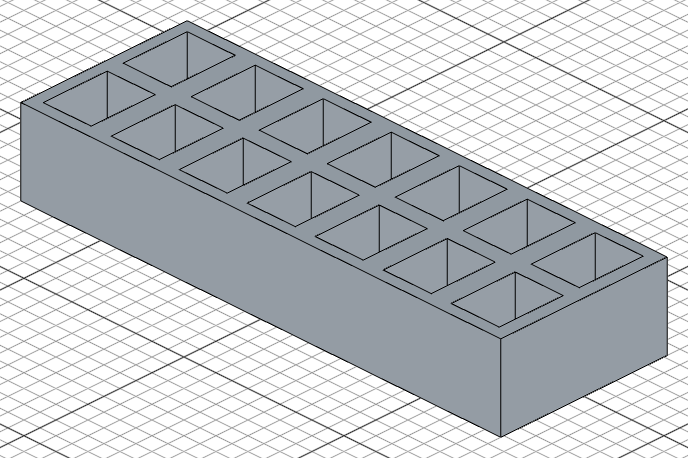
Each repetition cuts into the same tray, producing a single solid with 14 pockets — exactly what you'd want for a mold or tray design.