Selections and Filters
Fillet, chamfer, shell, and color all need you to tell them which edges or faces to target. FluidCAD gives you two ways to do that: direct selection from operations, and filter-based selection.
Direct selection
When you call extrude(), cut(), or other operations, the returned object lets you pick specific faces and edges:
const e = extrude(30)

fillet(5, e.endEdges())        // top edges
fillet(3, e.startEdges())      // bottom edges
shell(-4, e.endFaces())        // remove top face and hollow
color("blue", e.sideFaces())   // color the sides
You can also select by index when there are multiple faces or edges:
e.sideFaces(0)                 // the first side face
e.sideFaces(2)                 // the third side face
The select function
For more control, use select() with filters from fluidcad/filters:
import { select } from 'fluidcad/core';
import { edge, face } from 'fluidcad/filters';

select(edge().verticalTo("xy"))
fillet(3)
select() finds all matching geometry in the scene. The next operation (fillet, chamfer, color, etc.) automatically uses that selection.
Edge filters
Import edge (and face if using belongsToFace) from fluidcad/filters and chain filter methods:
import { edge, face } from 'fluidcad/filters';
By direction
edge().verticalTo("xy")        // edges perpendicular to the XY plane
edge().parallelTo("xz")        // edges parallel to the XZ plane
By position
edge().onPlane("xy", 30)                   // edges that lie on the XY plane at height 30
edge().onPlane("yz", { offset: 50, bothDirections: true }) // edges on YZ plane at offset ±50
By shape
edge().circle()                // circular edges
edge().arc()                   // arc-shaped edges
edge().line()                  // straight edges
edge().line(10)                // straight edges with length 10
By parent face
edge().belongsToFace(face().circle())         // edges on circular faces
edge().belongsToFace(face().parallelTo("xy")) // edges on faces parallel to XY

// or pass a scene object directly
const topFaces = select(face().onPlane("xy", 30));
edge().belongsToFace(topFaces)                // edges belonging to those faces
By source object
Restrict the selection to edges that come from one or more specific scene objects. Useful when several solids share the same scene and you only want to filter geometry from a subset of them.
const a = extrude(40, sketch("xy", () => rect(20, 20)))
const b = extrude(40, sketch("xy", () => circle(15)))

select(edge().from(a).line())                 // only line edges from `a`
select(edge().from(a, b).circle())            // circle edges from either `a` or `b`
from() composes with the rest of the chain (AND), so edge().from(a).onPlane("xy", 0) returns edges from a that also lie on the XY plane.
Negation
edge().notOnPlane("xy")        // edges NOT on the ground plane
edge().notCircle()             // edges that aren't circular
edge().notBelongsToFace(face().cylinder())  // edges NOT on cylindrical faces
Face filters
Import face (and edge if using hasEdge) from fluidcad/filters and chain filter methods:
import { face, edge } from 'fluidcad/filters';
By direction
face().parallelTo("xy")        // faces parallel to the XY plane (top/bottom faces)
face().parallelTo("xz")        // faces parallel to the XZ plane (front/back faces)
By position
face().onPlane("xy", 30) // faces on the XY plane at height 30
By shape
face().circle()                // circular (flat round) faces
face().cylinder()              // cylindrical faces
face().cone()                  // conical faces
By edge properties
face().edgeCount(4)            // faces with exactly 4 edges (rectangular faces)
face().hasEdge(edge().line())  // faces that have at least one straight edge
face().hasEdge(edge().circle(10))  // faces with a circular edge of diameter 10

// or pass a scene object directly
const circularEdges = select(edge().circle());
face().hasEdge(circularEdges)  // faces that share an edge with the selection
By source object
Restrict the selection to faces that come from one or more specific scene objects:
const a = extrude(40, sketch("xy", () => rect(20, 20)))
const b = extrude(40, sketch("xy", () => circle(15)))

select(face().from(a).parallelTo("xy"))       // top/bottom faces of `a`
select(face().from(a, b).cylinder())          // cylindrical faces from either object
from() composes with other filters as AND. When the surrounding select() is cloned by repeat() or mirror(), the references are remapped to the cloned objects automatically.
Negation
face().notOnPlane("xy", 0)     // faces NOT on the ground plane
face().notCircle()             // non-circular faces
face().notEdgeCount(4)         // faces that don't have exactly 4 edges
face().notHasEdge(edge().arc())  // faces without any arc edges
Using selections
With fillet and chamfer
select(edge().onPlane("xy", 30))
fillet(5)                      // fillets the selected edges

select(edge().verticalTo("xy"))
chamfer(2)                     // chamfers vertical edges
With shell
select(face().onPlane("xy", 30))
shell(-3)                      // removes selected face and hollows the solid
With color
select(face().circle())
color("red")                   // colors all circular faces red

select(face().parallelTo("xy"))
color("#3498db")               // hex colors work too
Passing directly
You can also pass filters directly to operations without calling select() first:
fillet(5, e.endEdges())                    // direct from operation
fillet(5, e.sideFaces(face().cylinder()))   // filter within direct selection
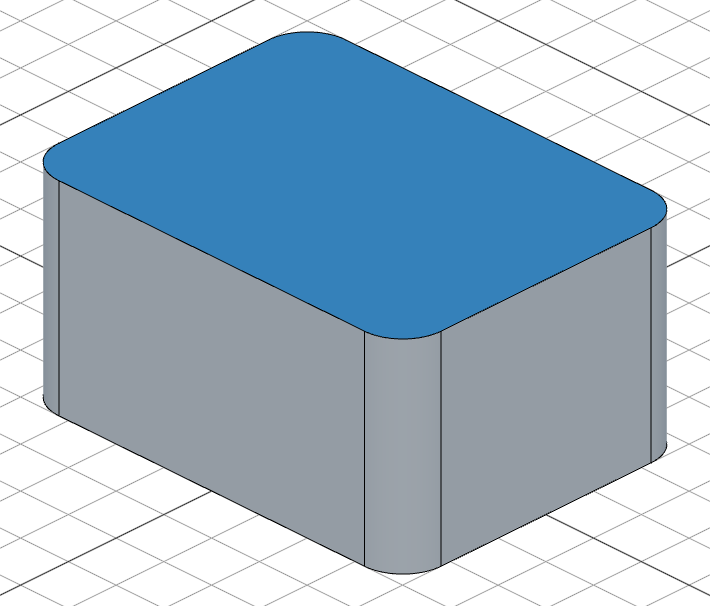
Example: selective filleting
Fillet only the vertical edges of a box, then color the top:
import { sketch, extrude, fillet, select, color } from 'fluidcad/core';
import { rect } from 'fluidcad/core';
import { edge, face } from 'fluidcad/filters';

sketch("xy", () => {
    rect(80, 60).centered()
})

const e = extrude(40)

// Round only the vertical edges
select(edge().verticalTo("xy"))
fillet(8)

// Color the top face
select(face().onPlane("xy", 40))
color("steelblue")