Constrained Geometry
Constrained geometry lets you create lines, arcs, and circles that are tangent to existing sketch elements. Instead of calculating positions and angles by hand, you describe the relationship you want and FluidCAD solves the geometry for you.
The three constrained primitives are:
tLine()— a line tangent to one or two objectstArc()— an arc tangent to objects, points, or the previous elementtCircle()— a circle tangent to two objects
Constraint qualifiers
When a constrained shape is tangent to a circle or curve, there are often multiple valid solutions. For example, a circle tangent to two other circles can sit between them, wrap around them, or fit inside them. Qualifiers let you specify which geometric relationship you want.
import { outside, enclosing, enclosed } from 'fluidcad/constraints';
Under the hood, these qualifiers correspond to the position of the solution relative to the "material side" of a curve — the interior of a circle (the filled region) or the left side of a line (relative to its direction). The three qualifiers describe three distinct spatial relationships:
outside(obj) — external tangency
The solution and obj are external to one another — they touch but do not overlap. For circles, this means the solution sits on the outside of obj, tangent at one point with no shared interior.
Use outside() when you want the solution to stay clear of the wrapped object — like a belt running around a pulley, or a tangent line that does not cross into the circle.
import { enclosing, outside } from "fluidcad/constraints";
import { circle, sketch } from "fluidcad/core";
import { tLine } from "fluidcad/core";

sketch("xy", () => {
    const c1 = circle(100).guide()
    const c2 = circle([200, 0], 40).guide()

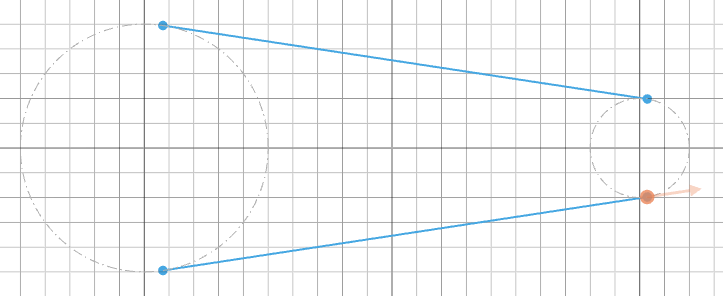
    tLine(outside(c1), outside(c2))
    tLine(enclosing(c1), enclosing(c2))
})
enclosing(obj) — the solution wraps around the object
The solution encloses obj — the argument circle is inside the solution. The solution is the larger shape that contains obj.
Use enclosing() when you want the solution to wrap around the constraint object. For example, a tangent arc that sweeps around a guide circle from the outside.
import { sketch, circle, tArc } from 'fluidcad/core';
import { enclosing } from 'fluidcad/constraints';

sketch("xy", () => {
    const c1 = circle(100).guide()
    const c2 = circle([200, 0], 80).guide()

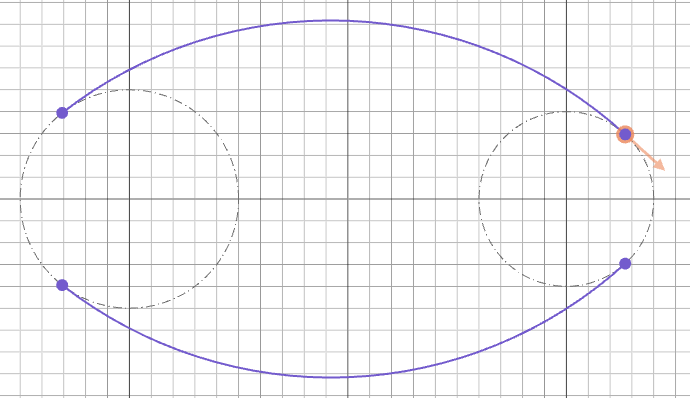
    tArc(enclosing(c1), enclosing(c2), 200)
})
enclosed(obj) — the solution fits inside the object
The solution is enclosed by obj — the solution sits inside the argument circle. This is the inverse of enclosing(): the solution is the smaller shape contained by obj.
Use enclosed() when you need a solution that fits within an existing circle — for instance, an internal tangent circle nestled inside a larger construction circle.
import { sketch, circle, tCircle } from 'fluidcad/core';
import { enclosed } from 'fluidcad/constraints';

sketch("xy", () => {
    const c1 = circle(300).guide()
    const c2 = circle([60, 0], 240).guide()

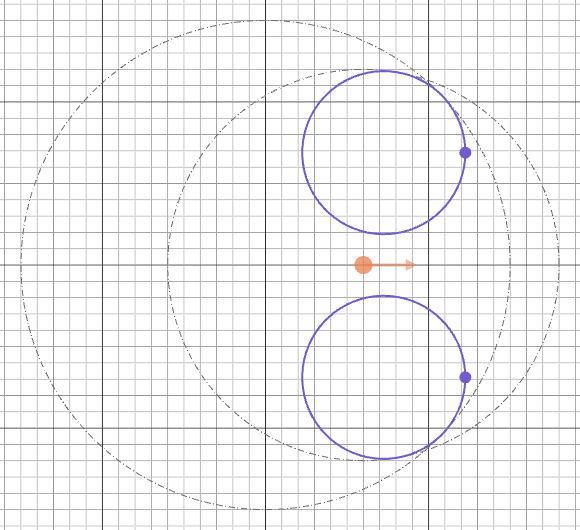
    tCircle(enclosed(c1), enclosed(c2), 100)
})
How qualifiers reduce the number of solutions
Without any qualifier, FluidCAD returns all geometrically valid solutions. For a circle tangent to two other circles, there can be up to 8 solutions. Qualifiers act as filters — each one constrains the spatial relationship for that argument, which narrows the result set. Combining qualifiers on both arguments (e.g., outside(c1) and enclosing(c2)) narrows the results further, often to just one or two solutions.
| Qualifier combination | Meaning |
|---|---|
outside(c1), outside(c2) | Solution is external to both circles |
enclosing(c1), enclosing(c2) | Solution wraps around both circles |
enclosed(c1), enclosed(c2) | Solution fits inside both circles |
enclosing(c1), outside(c2) | Solution wraps around c1 but stays external to c2 |
| No qualifiers | All valid solutions are returned |
All solutions (no qualifier)
With two guide circles and no qualifier, tLine() returns every valid tangent line:
import { circle, sketch } from "fluidcad/core";
import { tLine } from "fluidcad/core";

sketch("xy", () => {
    const c1 = circle(100).guide()
    const c2 = circle([200, 0], 40).guide()

    tLine(c1, c2)
})
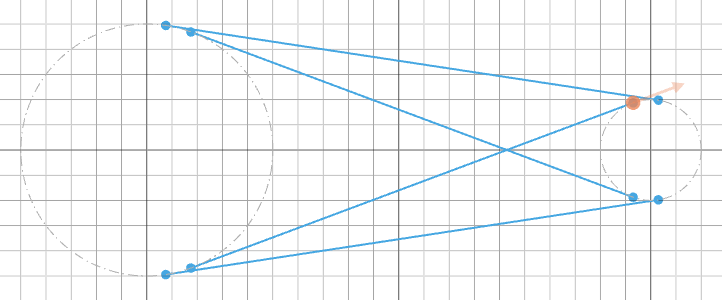
The mustTouch option
tArc() and tCircle() accept an optional mustTouch boolean as their last argument. The solver generally treats input lines and arcs as infinite — extending them to find tangent solutions even when those solutions don't physically meet the finite segments you drew. Passing mustTouch: true filters out those phantom solutions:
// @screenshot waitForInput
import { sketch, aLine, vLine, move, tCircle } from 'fluidcad/core';

sketch("xy", () => {
    const l1 = aLine(45, 200).guide()
    move([-50, 0])
    const l2 = vLine(200).guide()

    // Without mustTouch, the solver returns every valid tangent circle,
    // including ones that don't touch the finite line segments.
    tCircle(l1, l2, 200)
})
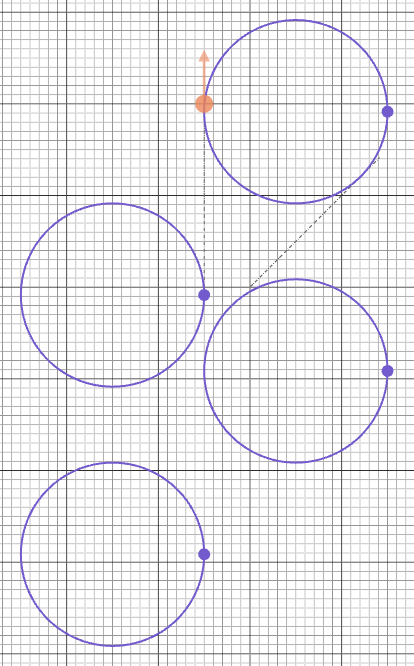
Without the filter, the solver returns every valid tangent circle, including ones that sit beyond the ends of the lines. Adding mustTouch: true keeps only the solutions in contact with both segments:
// @screenshot waitForInput
import { sketch, aLine, vLine, move, tCircle } from 'fluidcad/core';

sketch("xy", () => {
    const l1 = aLine(45, 200).guide()
    move([-50, 0])
    const l2 = vLine(200).guide()

    // mustTouch=true keeps only solutions that physically touch both segments
    tCircle(l1, l2, 200, true)
})
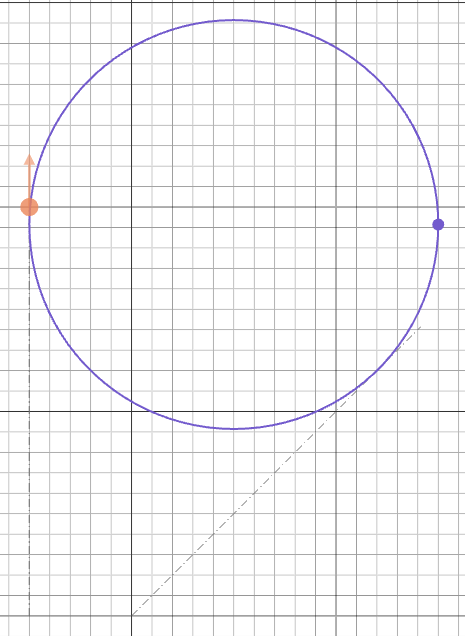
This is useful when the solver finds multiple valid tangent arcs or circles and you only want the ones in physical contact with both inputs.
tLine
Tangent continuation
The simplest use — draw a line that continues in the current tangent direction (shown by the orange arrow in the viewport):
sketch("xy", () => {
    arc(50, 0, 90)
    tLine(100)                 // 100 units in the tangent direction
})
See the Primitive Geometries guide for a screenshot of this form.
Tangent to two objects
Draw a line tangent to two circles, arcs, or curves. Without a qualifier the solver returns all valid tangent lines:
import { circle, sketch } from "fluidcad/core";
import { tLine } from "fluidcad/core";

sketch("xy", () => {
    const c1 = circle(100).guide()
    const c2 = circle([200, 0], 40).guide()

    tLine(c1, c2)
})
Different qualifiers select different tangent lines:
import { enclosing, outside } from "fluidcad/constraints";
import { circle, sketch } from "fluidcad/core";
import { tLine } from "fluidcad/core";

sketch("xy", () => {
    const c1 = circle(100).guide()
    const c2 = circle([200, 0], 40).guide()

    tLine(outside(c1), outside(c2))
    tLine(enclosing(c1), enclosing(c2))
})
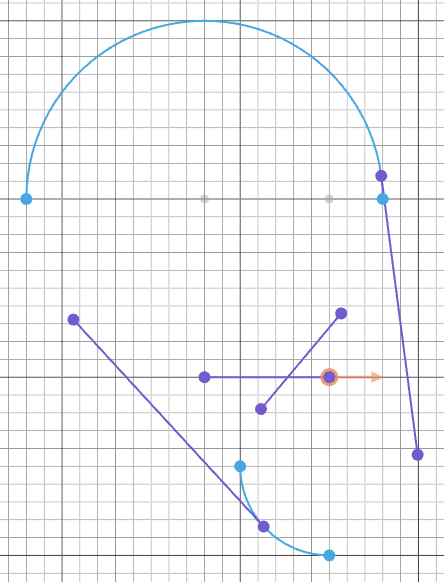
Tangent between arcs
The same two-object form works on arcs:
import { sketch, arc, move, tLine } from 'fluidcad/core';

sketch("xz", () => {
    move([-20, 0])
    const a1 = arc(100, 0, 180)
    move([50, -150])
    const a2 = arc(50, 270, 0)

    tLine(a1, a2)         // line tangent to both arcs
})
Accessing tangent line endpoints
The result of a two-object tLine() exposes .start() and .end() vertices, which you can use to connect other geometry:
const t1 = tLine(outside(c1), outside(c2))
const t2 = tLine(enclosing(c1), enclosing(c2))

// Connect the tangent lines with arcs
tArc(t1.end(), t2.end(), t1.tangent())
move(t1.start())
tArc(t2.start(), t1.start(), t1.tangent().reverse())
tArc
tArc() is the most flexible constrained primitive. It can create arcs in several ways.
Tangent continuation
Continue from the current position and tangent direction (shown by the orange arrow in the viewport):
sketch("front", () => {
    vLine(100)
    tArc(50, 180)              // radius 50, sweep 180°
    tArc(80, -270)             // radius 80, sweep -270° (clockwise)
})
Negative angles sweep clockwise, positive angles sweep counter-clockwise. See Primitive Geometries for the full set of continuation overloads (by radius/angle, to a point, with an explicit start tangent).
Tangent to two objects
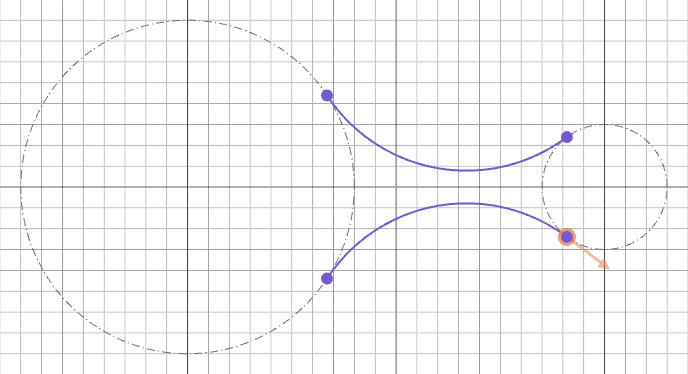
Draw an arc tangent to two circles, lines, arcs, or points. Without qualifiers, both possible arcs are returned:
import { sketch, circle, tArc } from 'fluidcad/core';
import { outside } from 'fluidcad/constraints';

sketch("xy", () => {
    const c1 = circle(160).guide()
    const c2 = circle([200, 0], 60).guide()

    tArc(outside(c1), outside(c2), 80)     // radius 80, outside both
})
Between a circle and a line
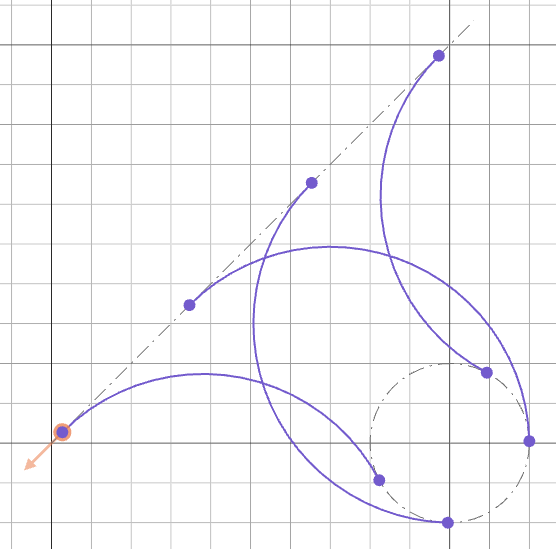
Mixing object types works too — the solver finds every arc of the requested radius tangent to both:
import { sketch, aLine, circle, tArc } from 'fluidcad/core';

sketch("xy", () => {
    const l = aLine(45, 150).guide()
    const c = circle([100, 0], 40).guide()

    tArc(c, l, 50)    // radius 50, tangent to both
})
Between two lines
A classic fillet — an arc of a given radius tangent to two intersecting lines:
import { sketch, aLine, vLine, move, tArc } from 'fluidcad/core';

sketch("xy", () => {
    const l1 = aLine(45, 150).guide()
    move([-50, 0])
    const l2 = vLine(100).guide()

    tArc(l1, l2, 50)  // fillet-like arc between two lines
})
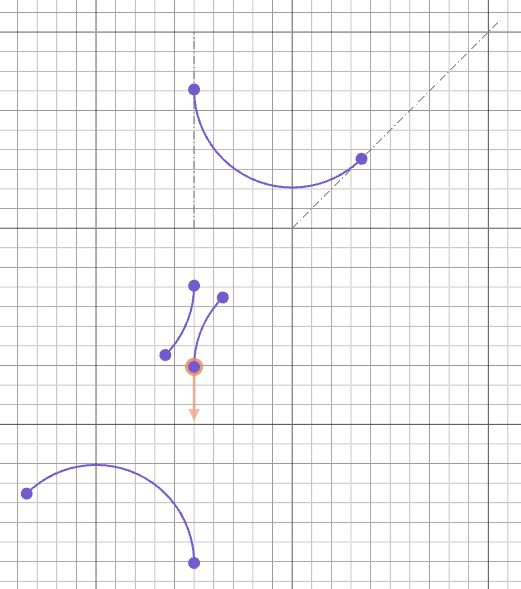
The solver returns the four fillet positions, one for each corner of the implied line intersection. Use qualifiers or mustTouch to pick the one you want.
Through two points
Two points and a radius define two possible arcs — the short one and the long one:
import { sketch, tArc } from 'fluidcad/core';

sketch("xy", () => {
    tArc([-50, 0], [50, 0], 150)   // arc through two points, radius 150
})

From object to point
tArc() accepts a mix of points and objects, so you can build an arc from a circle to a fixed point:
import { sketch, circle, move, tArc } from 'fluidcad/core';
import { outside } from 'fluidcad/constraints';

sketch("xy", () => {
    const c = circle([100, 0], 40).guide()
    const p = [100, 50]
    move(p)

    tArc(outside(c), p, 100)   // arc from circle to point, radius 100
})

tCircle
tCircle() creates a full circle tangent to two objects. It takes the two objects and a diameter.
Tangent to two circles
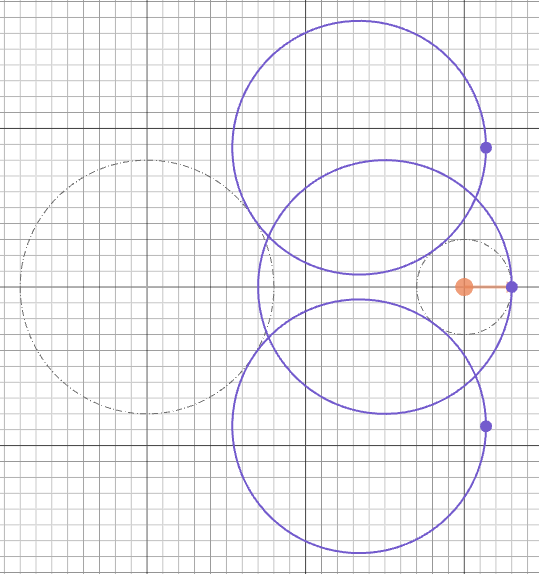
Up to eight tangent circles exist for any pair of circles. Qualifiers filter that down to the spatial relationship you want:
import { sketch, circle, tCircle } from 'fluidcad/core';
import { outside, enclosing } from 'fluidcad/constraints';

sketch("xy", () => {
    const c1 = circle(160).guide()
    const c2 = circle([200, 0], 60).guide()

    tCircle(c1, enclosing(c2), 160)         // tangent to c1, enclosing c2
    tCircle(outside(c1), outside(c2), 160)  // outside both
})
Tangent to two lines
tCircle() will inscribe a circle of the requested diameter at every angular sector formed by the two lines. The mustTouch: true argument keeps only the inscribed circles that actually touch the finite segments:
import { sketch, aLine, vLine, move, tCircle } from 'fluidcad/core';

sketch("xy", () => {
    const l1 = aLine(45, 300).guide()
    move([-50, 0])
    const l2 = vLine(300).guide()

    tCircle(l1, l2, 200, true)   // diameter 200, tangent to both lines
})
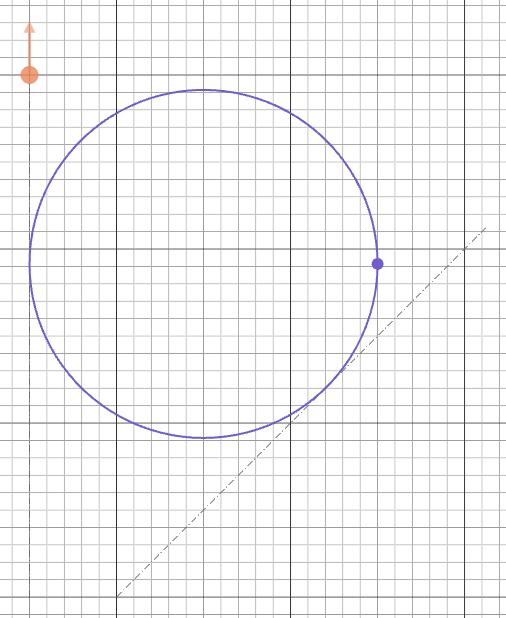
Between a circle and a line
import { sketch, aLine, circle, tCircle } from 'fluidcad/core';

sketch("xy", () => {
    const l = aLine(45, 150).guide()
    const c = circle([100, 0], 60).guide()

    tCircle(c, l, 100)
})
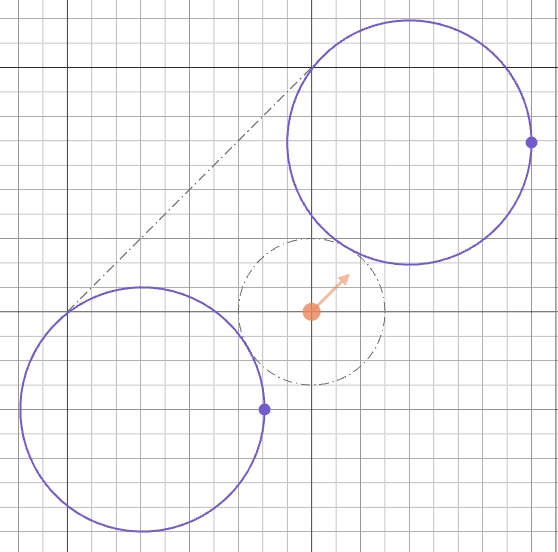
Through two points
The two-point form draws a circle of the requested diameter that passes through both points. Two solutions exist — one on each side of the chord:
import { sketch, tCircle } from 'fluidcad/core';

sketch("xy", () => {
    tCircle([-50, 0], [50, 0], 300)    // diameter 300, through both points
})