Transforms
Transforms move, rotate, and mirror existing geometry in 3D space.
Primitive shortcut
cylinder() and sphere() also expose chainable .translate(), .rotate(), and .mirror() methods for placing a primitive in a single expression. See the Chained Transforms guide.
Translate
Move a solid to a new position:
import { cylinder, sphere, translate } from 'fluidcad/core';

cylinder(50, 100)
sphere(50)

translate([150, 0, 0], true, cylinder)
Signatures:
translate(x, y, z)                 // move by x, y, z
translate([x, y, z])               // same, with an array
translate([x, y, z], true)         // copy instead of move (keeps the original)
translate([x, y, z], true, target) // copy a specific object
The third argument true creates a copy — the original stays in place and a duplicate appears at the new position.
Rotate
Rotate geometry around an axis:
// @screenshot showAxes
import { axis, extrude, rect, rotate, sketch } from 'fluidcad/core';

sketch("xy", () => {
    rect([100, 100], 200, 100)
})

extrude(20)

const a = axis("z", { offsetX: 90, offsetY: 90 })

rotate(a, 90, true)
rotate(a, 180, true)
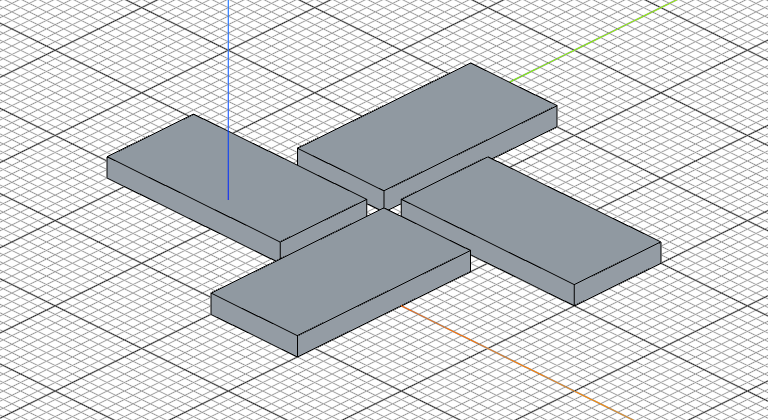
Defining axes
import { axis } from 'fluidcad/core';

axis("x")                                 // X axis at origin
axis("z")                                 // Z axis at origin
axis("z", { offsetX: 50, offsetY: 30 })   // Z axis offset from origin
Mirror
Mirror geometry across a plane:
// @screenshot showAxes
import { extrude, mirror, sketch } from 'fluidcad/core';
import { rect, move } from 'fluidcad/core';

sketch("xy", () => {
    move([10, 0])
    rect(50, 30)
})

extrude(20)

mirror("yz")
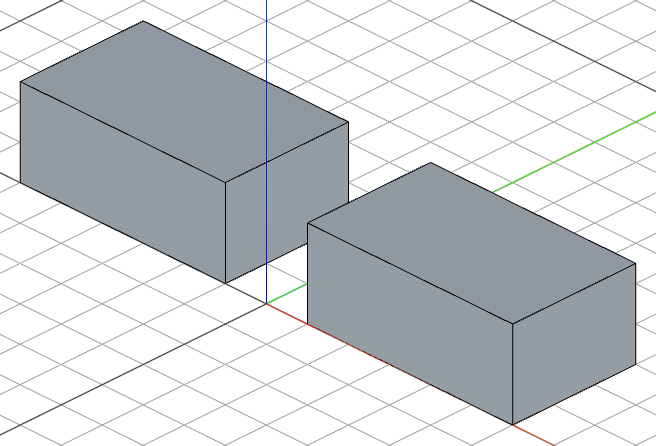
You can use any plane name ("xy", "xz", "yz", "front", "top", "right", etc.) or a custom plane() object.
Inside a sketch?
mirror() and rotate() also have 2D variants that transform sketch geometry directly, and copy() works inside a sketch too. See the 2D Transforms guide.