Ellipse
An ellipse: cams, oval bosses, and the elongated holes a slot is too square for. It is a solver entity like a circle — centre, rotation and both semi-radii are guesses the constraints drive.
In the viewport
- Click Ellipse on the sketch toolbar (shortcut
el). - Click the centre. The X / Y pill places it exactly; a centre that snaps onto a vertex or the origin gets a coincident written for it.
- Move the cursor out: its horizontal offset from the centre is RX, its vertical offset RY. Click or press Enter to take the RX pill, then again for RY — or type either value (a number, a variable, or an expression).
The drawn ellipse is as free as a drawn circle: its centre snaps and pins like any point, but nothing else is inferred. Pick the ellipse and click Horizontal or Vertical to orient its RX axis — or let a tangent or a point on the outline turn it. An ellipse has one orientation, so Horizontal and Vertical swap rather than stack.
The semi-radii are dimensions you add when you want them, exactly like a circle's diameter: pick the ellipse and click Dimension — near the end of the RX axis it writes radius(e, …, 'x') with an RX pill, near the end of the RY axis radius(e, …, 'y') with an RY pill. A value typed into the RX or RY pill while drawing writes that dimension straight away; a cursor-sized one stays a free guess. Double-click the RX/RY readout to change the value later.
By hand
ellipse(center, rx, ry)
ellipse(center, rx, ry, rotation)
rx and ry are the semi-radii (half the width and half the height) along the ellipse's own RX and RY axes; rotation (degrees) is the angle of the RX axis from the sketch's X axis, 0 when omitted. All of them are guesses like the centre literal: the solver resizes and turns the ellipse as the constraints require, and a drag writes the solved values back into the statement.
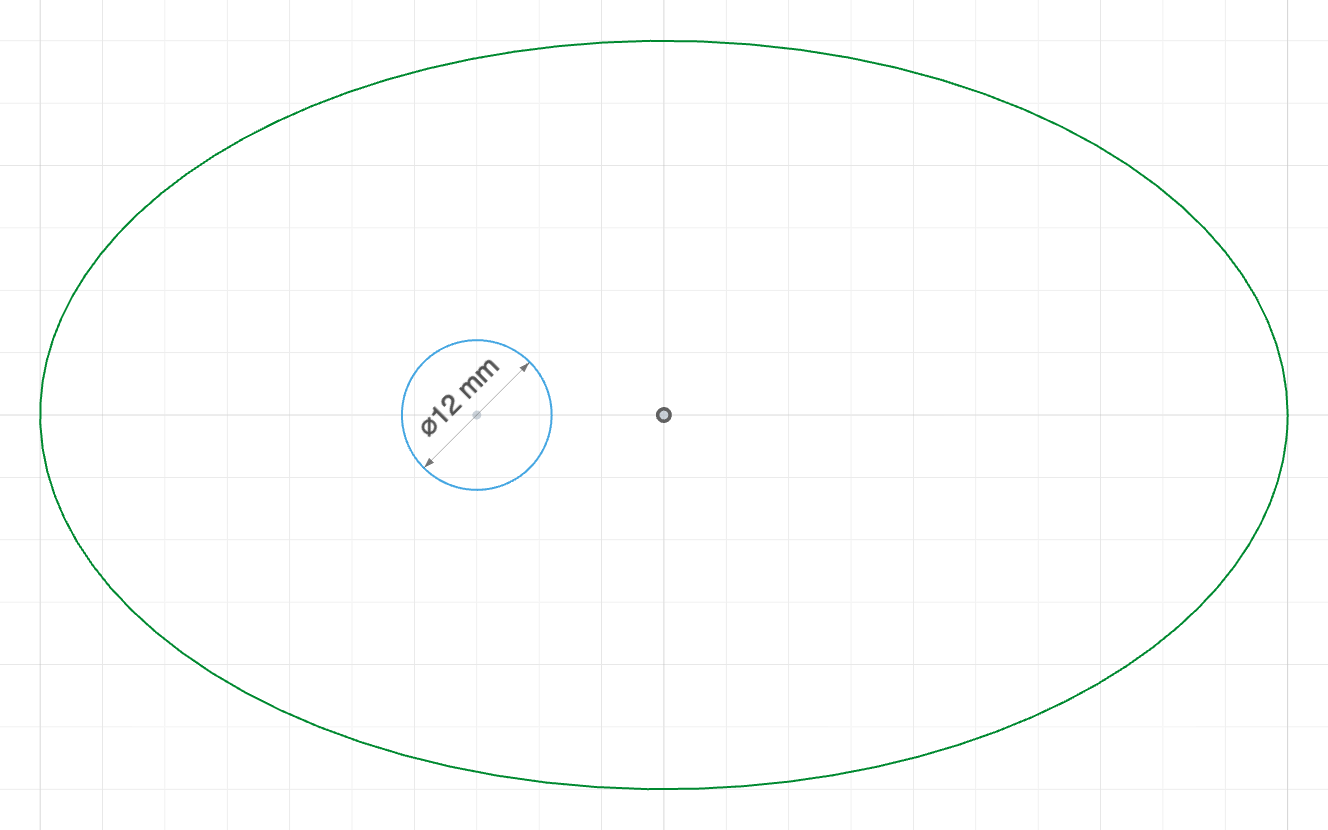
The code behind it
import { sketch, ellipse, circle, origin } from 'fluidcad/core';
import { coincident, diameter, horizontal, radius } from 'fluidcad/constraints';

sketch("xy", () => {
    // An elliptical cam with its shaft bore.
    // ellipse(center, rx, ry): semi-radii along the ellipse's own axes —
    // guesses, like the centre; the constraints below pin all of them.
    const cam = ellipse([0, 0], 50, 30);
    // Pin the centre on the sketch origin and the RX axis along X.
    coincident(cam.center(), origin());
    horizontal(cam);
    // Size the two semi-axes.
    radius(cam, 50, 'x');
    radius(cam, 30, 'y');
    // The shaft bore, offset from the cam's centre so the lobe leads.
    const bore = circle([-15, 0], 12);
    diameter(bore, 12);
})
Constraints
The ellipse statement itself is a constraint target, and so is its centre:
| Statement | Meaning |
|---|---|
radius(e, v, 'x') | Dimensions the RX semi-radius (1 DOF); 'y' dimensions RY |
equal(e, f) | Two ellipses share their shape — both semi-radii (2 DOF) |
horizontal(e) | The RX axis runs along the sketch's X axis (1 DOF) |
vertical(e) | The RX axis runs along the sketch's Y axis (1 DOF) |
concentric(e, c) | Shares its centre with a circle, arc or another ellipse (2 DOF) |
tangent(e, l) | Touches a line — anywhere along it, or at a line end placed on the outline with coincident |
tangent(e, c) | Touches a circle, an arc, or another ellipse, from outside or inside (the guess decides) |
coincident(p, e) | Puts a point on the outline (1 DOF) |
e.center() | The centre point — every point constraint (coincident, distance, midpoint, symmetric, fix, a horizontal/vertical pair with another point) |
A fully constrained ellipse has its centre pinned, its RX axis oriented and both semi-radii dimensioned — five degrees of freedom, like a circle's three: coincident(e.center(), origin()), horizontal(e), radius(e, 50, 'x'), radius(e, 30, 'y'). diameter refuses an ellipse (there is no single diameter to name).
Modifiers
ellipse([0, 0], 50, 25).guide()
ellipse([0, 0], 50, 25).name('cam')