Project
Project flattens 3D edges and faces — or the geometry of a previous sketch — onto the sketch plane. The projected curves are fixed reference geometry: the solver never moves them, they render as locked (green) geometry, and your sketch geometry can be constrained against them. It is how a feature follows the shape of what is already there.
In the viewport
- Click Project on the sketch toolbar. The Project dialog opens with one Selection slot.
- Click the 3D edges and faces to bring in — a face projects its outline, an edge projects itself. Click the geometry of a previous sketch to bring in that whole sketch. Picks accumulate as chips.
A face's outline is what you would see of it from the sketch plane: its boundary edges plus, for a curved face, the silhouette where the surface turns past the view. A cylinder seen from the side comes in as a rectangle, seen along its axis as a circle; a circle seen edge-on becomes a line across its diameter. Seams are never projected.
3. Apply writes the project(…) statement at the top of the sketch body, where the references it creates are available to every constraint after it.
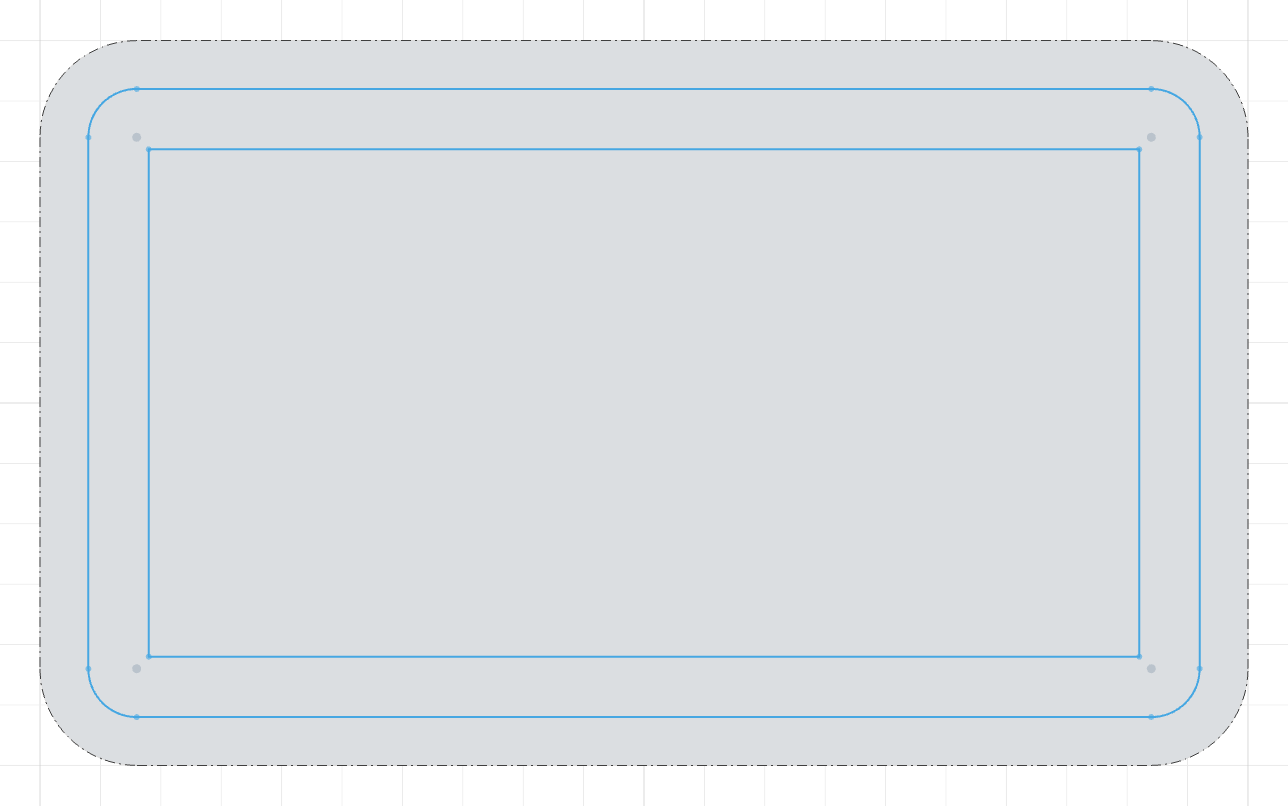
The code behind it
import { sketch, line, fillet, extrude, project, offset } from 'fluidcad/core';
import { coincident, distance, fix, horizontal, vertical } from "fluidcad/constraints";

// A rounded housing lid, 100 × 60 × 30.
sketch("xy", () => {
    const sg1 = line([-50, -30], [50, -30]);
    const sg2 = line([50, -30], [50, 30]);
    const sg3 = line([50, 30], [-50, 30]);
    const sg4 = line([-50, 30], [-50, -30]);
    coincident(sg1.end(), sg2.start());
    coincident(sg2.end(), sg3.start());
    coincident(sg3.end(), sg4.start());
    coincident(sg4.end(), sg1.start());
    horizontal(sg1);
    vertical(sg2);
    horizontal(sg3);
    vertical(sg4);
    fix(sg1.start(), [-50, -30]);
    distance(sg1.start(), sg1.end(), 100);
    distance(sg2.start(), sg2.end(), 60);
    fillet(8, sg1, sg2, sg3, sg4)
})

const e = extrude(30)

// A gasket that follows the lid's outline, drawn on its top face.
sketch(e.endFaces(), () => {
    // The top face outline, flattened onto this sketch as fixed reference
    // geometry. It is a guide so it stays out of the profile.
    const outline = project(e.endFaces()).guide()
    // Inset it — the offset is the gasket's inner edge; the region between
    // the two offsets is the gasket.
    offset(-4, outline)
    offset(-9, outline)
})
From another part
Inside a part you can project the faces and edges of a part declared before it. Pick them like any other source: the dialog shows a notice naming the part they belong to, and Apply stays put until you press Expose and project.
Confirming does two things in one edit: it writes an expose() for each picked face or edge into that part's body (a face or edge it already exposes is reused as is), and it projects the references in your sketch:
export const lid = part("Lid", () => {
    // ...
    const body = extrude(6)
    expose('g1', body.endFaces(0))          // written into the lid for you
})

export const gasket = part("Gasket", () => {
    sketch("xy", () => {
        project(lid.features.g1)             // your sketch reads the exposure
    })
})
Picks from your own part stay ordinary selectors, so a mixed selection reads project(b.endFaces(0), lid.features.g1). Removing a cross-part pick, or adding another one, asks for the confirmation again. The lid's part statement must be bound to a const (exported if it lives in another file) so the reference has a name to use.
From a previous sketch
A sketch that is still on screen — a layout sketch no feature has used yet — can be picked as a whole: click any of its curves while the Project dialog is open and the chip names the sketch's variable. Apply writes the sketch as a bare argument, binding the statement to a const if it has none yet:
const layout = sketch("xy", () => {
    circle([0, 0], 40)
})

sketch(e.endFaces(), () => {
    const rim = project(layout)             // the layout's circle, as a fixed reference
    const c = circle([0, 0], 10)
    concentric(c, rim)
})
The source sketch is referenced, not consumed: it stays on screen and any feature can still use it. Written by hand, project(s1) also works for a sketch an extrude has already used — the projection reads the sketch's geometry as its own body left it — and project(s1.geometries.c) picks one entity the sketch's callback returned. A sketch drawn on another plane projects edge-on: curves normal to the sketch plane vanish, and coincident results fold into one edge. A sketch cannot project itself, and only sketches declared before the receiving sketch, in the same part, can be picked.
By hand
project(e.endFaces())              // a face → its outline
project(e.endEdges())              // just the edges
project(face1, face2, edge1)       // several sources at once
project(layout, e.endEdges())      // a previous sketch next to 3D sources
Projections usually carry .guide() so the outline stays out of the profile and only the geometry built against it is extruded or cut.
Constraining against a projection
A projection is a first-class constraint target:
sketch(e.endFaces(), () => {
    const rim = project(e.endEdges()).guide()   // a single edge: use it directly
    const c = circle([10, 0], 12)
    concentric(c, rim)                          // a bore concentric with the rim
})
When a projection produces several edges, address one with .ref(i) and its points with the usual accessors:
const outline = project(e.endFaces()).guide()   // four edges, say
coincident(p, outline.ref(0).start())
distance(outline.ref(2), c.center(), 25)
tangent(outline.ref(1), l)
Because references are fixed, a sketch made only of projections reports Fully constrained by itself — the geometry you add is what brings degrees of freedom.
Intersect is the companion tool: instead of flattening along the sketch normal, it cuts the sketch plane through 3D objects and brings the section curves in, with the same fixed-reference behaviour.