Building a 45 Degree Custom Elbow
In this tutorial, you'll build a 45° pipe elbow with a square base flange and a round slotted flange, based on the original design by Too Tall Toby. It covers reused spine sketches, tangent-arc paths built from constraints, sweeping individual sketch regions, boring with a removal sweep, sketching on swept end faces, circular sketch copies, stepped slot cuts, and circular feature repeats around an axis built from a sketch segment.
Create a new file called custom-elbow.fluid.js in your project.
Setup
Start with the imports.
import { arc, axis, circle, copy, cut, extrude, fillet, line, project, remove,
    repeat, sketch, sweep } from "fluidcad/core";
import { coincident, concentric, diameter, distance, equal, fix, horizontal,
    radius, tangent, vertical } from "fluidcad/constraints";
The geometry primitives and 3D operations come from fluidcad/core; the constraint statements that pin the geometry down come from fluidcad/constraints.
Step 1: The elbow spine
The whole part hangs off a single path: a vertical run, a 45° bend, and a straight exit. We draw it once on the front plane and reuse it for everything else — the pipe sweep, the bore sweep, and the pattern axis at the end.
const spine = sketch("front", () => {
    const riser = line([0, 0], [0, 1.5]);
    const bend = arc([0, 1.5], [1.171573, 4.328427], [4, 1.5]).cw();
    const topSegment = line([1.171573, 4.328427], [2.232233, 5.389087]);

    coincident(riser.end(), bend.start());
    coincident(bend.end(), topSegment.start());
    vertical(riser);
    tangent(riser, bend);
    tangent(bend, topSegment);
    fix(riser.start(), [0, 0]);
    distance(riser.start(), riser.end(), 1.5);
    radius(bend, 4);
    distance(topSegment.start(), topSegment.end(), 1.5);

    return {
        topSegment
    }
});
The true after the callback makes this a constraint sketch: the geometry statements are guesses, and the constraint statements below them decide where everything actually lands. line and arc take fully-specified coordinates — an arc is given by its start, end, and center — and the solver adjusts them to satisfy the constraints.
The path itself is three connected segments. The two coincident constraints chain them end-to-start, vertical(riser) keeps the first leg straight up, and the two tangent constraints make the bend flow smoothly out of the riser and into the exit leg — that tangency is what makes the exit leave at exactly 45° once the arc spans a 45° turn. fix anchors the path's start at the origin, and the dimensions pin the sizes: a 1.5 riser, a radius-4 bend, and a 1.5 exit. The .cw() on the arc picks the clockwise sweep from start to end, so the bend curls away from the vertical run instead of back over it.
We return topSegment from the sketch callback — whatever the callback returns is attached as .geometries on the sketch, so spine.geometries.topSegment gives us a named handle on that last straight segment. We'll turn it into the pattern axis in the final step.
A 3D operation only takes a sketch off the screen, so this spine can drive all three of its consumers by variable.

Step 2: The pipe
Sketch the profile
The pipe cross-section is two concentric circles on the top plane, centered where the spine starts.
const profile = sketch("top", () => {
    const innerPipe = circle([0, 0], 1.5);
    const outerPipe = circle([0, 0], 2);
    return {
        innerPipe,
        outerPipe
    }
  });
circle([0, 0], 1.5) is the bore — 1.5 units in diameter at the origin — and circle([0, 0], 2) is the pipe's outside diameter, giving a 0.25 wall. Returning both attaches them as named regions, so we can hand each circle to a different sweep.

Sweep the outer pipe
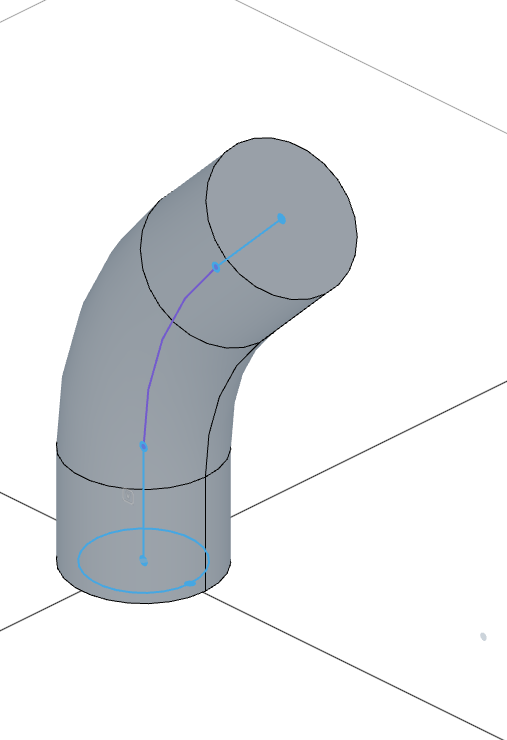
const pipe = sweep(spine, profile.geometries.outerPipe);
sweep(spine, profile.geometries.outerPipe) drives the outer circle along the spine, producing a solid bent rod. Because we pass one specific region instead of the whole sketch, the innerPipe region stays available — we'll sweep it later to bore the pipe out. We capture the result as pipe so we can sketch on its end face in step 4.
Step 3: The base flange
Sketch the plate
The base flange is a rounded square plate with four bolt holes, drawn on the top plane around the foot of the pipe.
sketch("top", () => {
    const bottom = line([-1.75, -1.75], [1.75, -1.75]);
    const right = line([1.75, -1.75], [1.75, 1.75]);
    const top = line([1.75, 1.75], [-1.75, 1.75]);
    const left = line([-1.75, 1.75], [-1.75, -1.75]);
    const bolt = circle([-1.25, -1.25], 0.5);

    coincident(bottom.end(), right.start());
    coincident(right.end(), top.start());
    coincident(top.end(), left.start());
    coincident(left.end(), bottom.start());
    horizontal(bottom);
    vertical(right);
    horizontal(top);
    vertical(left);
    fix(bottom.start(), [-1.75, -1.75]);
    distance(bottom.start(), bottom.end(), 3.5);
    distance(right.start(), right.end(), 3.5);
    fix(bolt.center(), [-1.25, -1.25]);
    diameter(bolt, 0.5);

    fillet(0.5, bottom, right, top, left);
    copy("circular", [0, 0], {
        count: 4,
        angle: 360
    }, bolt);
});
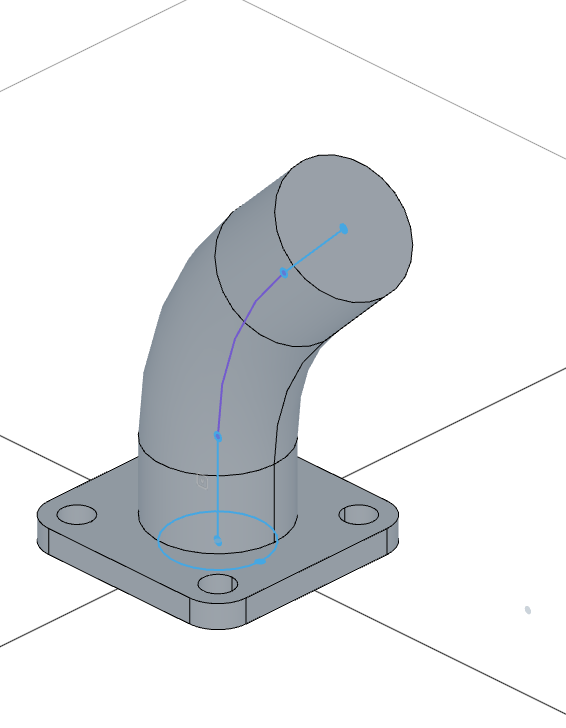
The four lines close into a 3.5-unit square centered on the origin: coincident corners, horizontal/vertical sides, one fixed corner, and two distance dimensions make it fully constrained. fillet(0.5, ...) then rounds every corner shared by the four lines with a 0.5-radius arc.
The bolt hole is a 0.5-diameter circle fixed at [-1.25, -1.25] — one corner of the 2.5 × 2.5 bolt pattern. copy("circular", [0, 0], { count: 4, angle: 360 }, bolt) copies that hole 4 times evenly around the sketch origin, landing one hole near each corner of the plate. Because the holes are closed shapes inside the plate outline, they extrude as cutouts automatically.

Extrude the plate
extrude(.375)
extrude(.375) raises the plate 0.375 units. It fuses with the bottom of the pipe into a single body.
Step 4: The upper flange
Sketch on the pipe's end face
The round flange sits on the angled end of the pipe, so we sketch directly on the face the sweep finished on.
sketch(pipe.endFaces(), () => {
    const rim = project(pipe.endFaces()).guide();
    const flange = circle([0, 0], 4);

    concentric(flange, rim);
    diameter(flange, 4);
  });
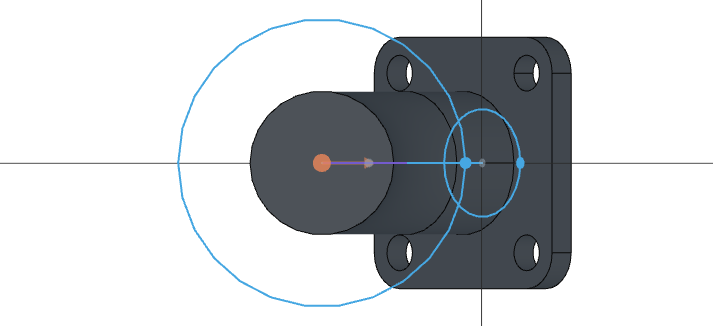
pipe.endFaces() returns the face at the end of the sweep path — the 45° face. Sketching on it orients the sketch to that plane, but the sketch's local origin is not necessarily the center of the pipe, so we don't hardcode the flange position. Instead, project(pipe.endFaces()) brings the face's circular rim into the sketch as a fixed reference — .guide() keeps it out of the profile — and concentric(flange, rim) locks the drawn circle onto the pipe's centerline. With diameter(flange, 4) the flange disc is fully constrained: a 4-diameter circle exactly concentric with the pipe, wherever the face sits.
Extrude back into the pipe
const upperFlange = extrude(-.625)
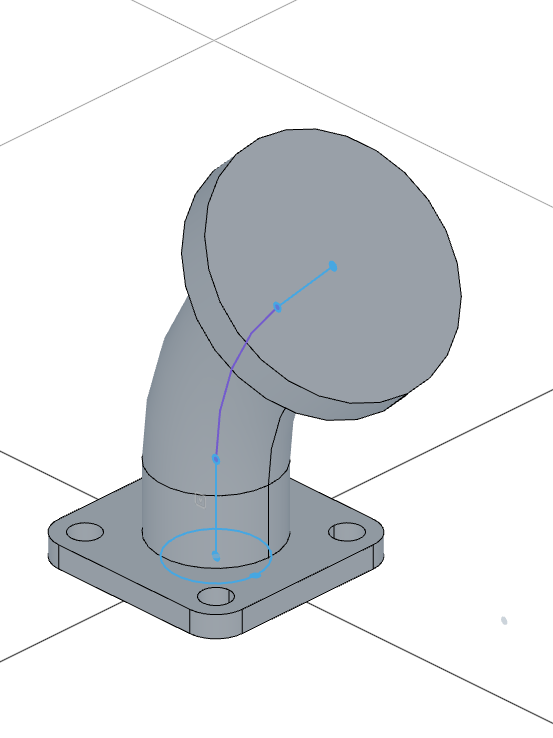
extrude(-.625) extrudes 0.625 units in the negative direction — back down the pipe — so the flange ends up flush with the pipe's end instead of floating past it. We keep it as upperFlange to sketch the bolt slots on it next.
Step 5: Boring the pipe
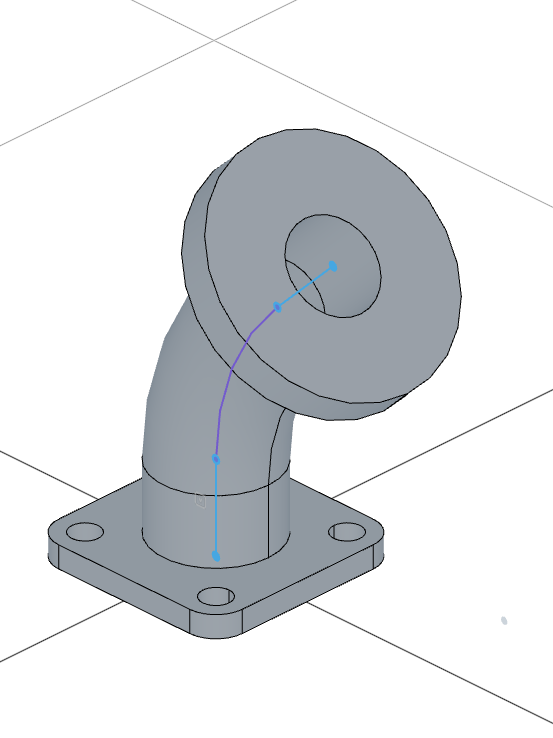
So far the pipe is a solid rod, and both flanges block its ends. One sweep opens the whole passage.
sweep(spine, profile.geometries.innerPipe).remove()
This sweeps the 1.5-diameter innerPipe region along the same spine, and .remove() turns the sweep into a subtraction — instead of adding the swept solid, it carves it out of everything it passes through. The pipe wall, the base plate, and the upper flange all get bored in a single operation.
Step 6: The bolt slots
Sketch two stacked slots
The upper flange carries four radial bolt slots, each with a wider shallow relief around a narrower through-slot. The two slot outlines get cut to different depths, so we draw each one in its own sketch — one region per sketch — and pattern the cuts later.
const outerSlot = sketch(upperFlange.endFaces(), () => {
    const outline = project(upperFlange.endFaces()).guide();
    const spoke = line([0, 0], [1.625, 0]).guide();
    const bottom = line([1.625, -0.375], [2.625, -0.375]);
    const capRight = arc([2.625, -0.375], [2.625, 0.375], [2.625, 0]);
    const top = line([2.625, 0.375], [1.625, 0.375]);
    const capLeft = arc([1.625, 0.375], [1.625, -0.375], [1.625, 0]);

    coincident(bottom.end(), capRight.start());
    coincident(capRight.end(), top.start());
    coincident(top.end(), capLeft.start());
    coincident(capLeft.end(), bottom.start());
    horizontal(bottom);
    horizontal(top);
    tangent(bottom, capRight);
    tangent(top, capLeft);
    equal(capRight, capLeft);
    radius(capRight, 0.375);
    horizontal(spoke);
    coincident(spoke.start(), outline.ref(0).center());
    coincident(spoke.end(), capLeft.center());
    distance(spoke.start(), spoke.end(), 1.625);
    distance(capLeft.center(), capRight.center(), 1);
});
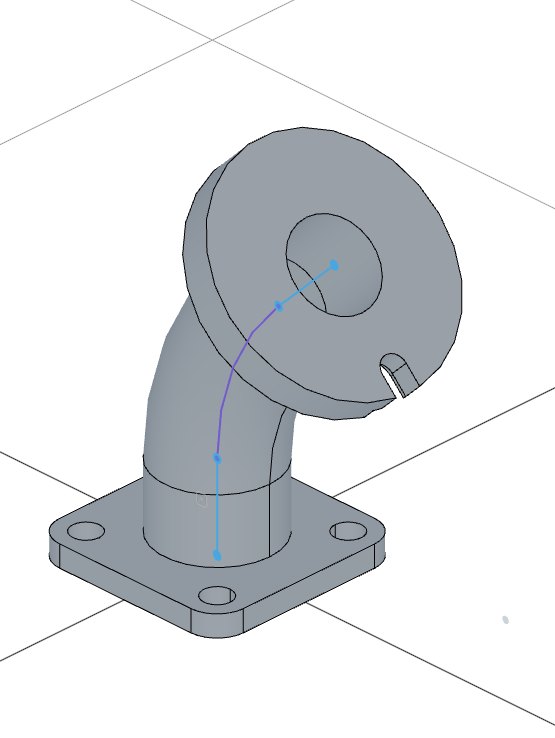
upperFlange.endFaces() is the face the flange extrusion finished on. The slot itself is two horizontal lines capped by two semicircular arcs: the coincidents close the outline, the tangent constraints blend the lines into the caps, equal keeps both caps the same radius, and the dimensions make it 1 unit long with 0.375-radius caps — 0.75 wide.
What places the slot is the spoke: as in step 4, we don't assume the flange's center is the sketch origin. project(upperFlange.endFaces()).guide() brings the face outline in as a fixed reference — both of its edges (the flange rim and the bore) are circles centered on the pipe axis, so outline.ref(0).center() is the flange center. The spoke guide line starts there, runs horizontally, and ends on the left cap center, and distance(..., 1.625) puts that cap on the 3.25-diameter bolt circle. Because both the spoke and the slot are horizontal, the slot extends radially outward from the flange center.
const innerSlot = sketch(upperFlange.endFaces(), () => {
    const outline = project(upperFlange.endFaces()).guide();
    const spoke = line([0, 0], [1.625, 0]).guide();
    const bottom = line([1.625, -0.225], [2.625, -0.225]);
    const capRight = arc([2.625, -0.225], [2.625, 0.225], [2.625, 0]);
    const top = line([2.625, 0.225], [1.625, 0.225]);
    const capLeft = arc([1.625, 0.225], [1.625, -0.225], [1.625, 0]);

    coincident(bottom.end(), capRight.start());
    coincident(capRight.end(), top.start());
    coincident(top.end(), capLeft.start());
    coincident(capLeft.end(), bottom.start());
    horizontal(bottom);
    horizontal(top);
    tangent(bottom, capRight);
    tangent(top, capLeft);
    equal(capRight, capLeft);
    radius(capRight, 0.225);
    horizontal(spoke);
    coincident(spoke.start(), outline.ref(0).center());
    coincident(spoke.end(), capLeft.center());
    distance(spoke.start(), spoke.end(), 1.625);
    distance(capLeft.center(), capRight.center(), 1);
});
The inner slot is the same construction with 0.225-radius caps — a narrower 0.45-wide slot. Anchored by an identical spoke to the same flange center, it lands exactly on the outer slot's footprint.

Cut each slot to its own depth
const s1 = cut(innerSlot)
const s2 = cut(.25, outerSlot)
cut(innerSlot) with no depth cuts the narrow slot all the way through the flange. cut(.25, outerSlot) cuts the wide slot only 0.25 deep, leaving a stepped recess around the through-slot. We capture both cuts as s1 and s2 — they're the features we're about to pattern.
Step 7: Pattern the slots and clean up
const a = axis(spine.geometries.topSegment)

repeat("circular", a, {
    count: 4,
    angle: 360
}, s1, s2)

remove(spine);
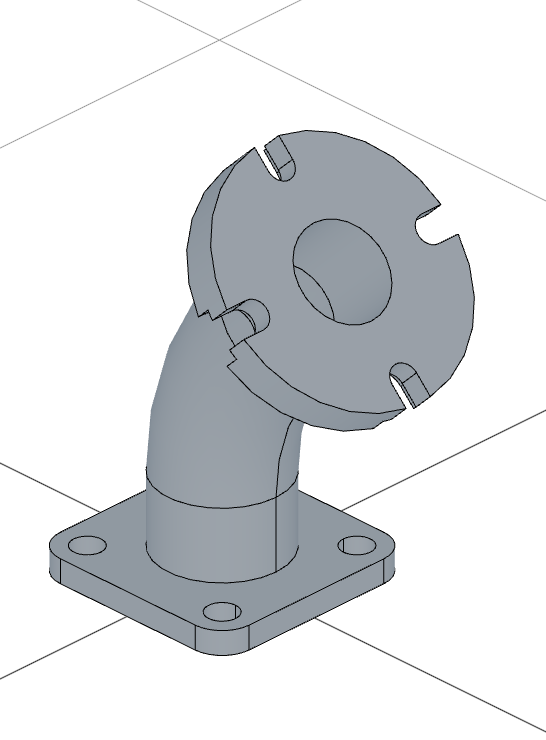
axis(spine.geometries.topSegment) builds an axis from the spine's straight exit segment — the segment we named back in step 1. That line is the pipe's centerline through the upper flange, exactly the axis the bolt pattern revolves around. repeat("circular", a, { count: 4, angle: 360 }, s1, s2) repeats both cuts 4 times evenly around it, giving four stepped slots at 90° spacing.
Finally, remove(spine) drops the spine sketch for good — every consumer is done with it, so no later operation can take it and it no longer shows when the timeline is scrubbed back.
Full code
Open this model in the 3D viewer// @screenshot waitForInput
import { arc, axis, circle, copy, cut, extrude, fillet, line, project, remove,
repeat, sketch, sweep } from "fluidcad/core";
import { coincident, concentric, diameter, distance, equal, fix, horizontal,
radius, tangent, vertical } from "fluidcad/constraints";
const spine = sketch("front", () => {
const riser = line([0, 0], [0, 1.5]);
const bend = arc([0, 1.5], [1.171573, 4.328427], [4, 1.5]).cw();
const topSegment = line([1.171573, 4.328427], [2.232233, 5.389087]);
coincident(riser.end(), bend.start());
coincident(bend.end(), topSegment.start());
vertical(riser);
tangent(riser, bend);
tangent(bend, topSegment);
fix(riser.start(), [0, 0]);
distance(riser.start(), riser.end(), 1.5);
radius(bend, 4);
distance(topSegment.start(), topSegment.end(), 1.5);
return {
topSegment
}
});
const profile = sketch("top", () => {
const innerPipe = circle([0, 0], 1.5);
const outerPipe = circle([0, 0], 2);
return {
innerPipe,
outerPipe
}
});
const pipe = sweep(spine, profile.geometries.outerPipe);
sketch("top", () => {
const bottom = line([-1.75, -1.75], [1.75, -1.75]);
const right = line([1.75, -1.75], [1.75, 1.75]);
const top = line([1.75, 1.75], [-1.75, 1.75]);
const left = line([-1.75, 1.75], [-1.75, -1.75]);
const bolt = circle([-1.25, -1.25], 0.5);
coincident(bottom.end(), right.start());
coincident(right.end(), top.start());
coincident(top.end(), left.start());
coincident(left.end(), bottom.start());
horizontal(bottom);
vertical(right);
horizontal(top);
vertical(left);
fix(bottom.start(), [-1.75, -1.75]);
distance(bottom.start(), bottom.end(), 3.5);
distance(right.start(), right.end(), 3.5);
fix(bolt.center(), [-1.25, -1.25]);
diameter(bolt, 0.5);
fillet(0.5, bottom, right, top, left);
copy("circular", [0, 0], {
count: 4,
angle: 360
}, bolt);
});
extrude(.375)
sketch(pipe.endFaces(), () => {
const rim = project(pipe.endFaces()).guide();
const flange = circle([0, 0], 4);
concentric(flange, rim);
diameter(flange, 4);
});
const upperFlange = extrude(-.625)
sweep(spine, profile.geometries.innerPipe).remove()
const outerSlot = sketch(upperFlange.endFaces(), () => {
const outline = project(upperFlange.endFaces()).guide();
const spoke = line([0, 0], [1.625, 0]).guide();
const bottom = line([1.625, -0.375], [2.625, -0.375]);
const capRight = arc([2.625, -0.375], [2.625, 0.375], [2.625, 0]);
const top = line([2.625, 0.375], [1.625, 0.375]);
const capLeft = arc([1.625, 0.375], [1.625, -0.375], [1.625, 0]);
coincident(bottom.end(), capRight.start());
coincident(capRight.end(), top.start());
coincident(top.end(), capLeft.start());
coincident(capLeft.end(), bottom.start());
horizontal(bottom);
horizontal(top);
tangent(bottom, capRight);
tangent(top, capLeft);
equal(capRight, capLeft);
radius(capRight, 0.375);
horizontal(spoke);
coincident(spoke.start(), outline.ref(0).center());
coincident(spoke.end(), capLeft.center());
distance(spoke.start(), spoke.end(), 1.625);
distance(capLeft.center(), capRight.center(), 1);
});
const innerSlot = sketch(upperFlange.endFaces(), () => {
const outline = project(upperFlange.endFaces()).guide();
const spoke = line([0, 0], [1.625, 0]).guide();
const bottom = line([1.625, -0.225], [2.625, -0.225]);
const capRight = arc([2.625, -0.225], [2.625, 0.225], [2.625, 0]);
const top = line([2.625, 0.225], [1.625, 0.225]);
const capLeft = arc([1.625, 0.225], [1.625, -0.225], [1.625, 0]);
coincident(bottom.end(), capRight.start());
coincident(capRight.end(), top.start());
coincident(top.end(), capLeft.start());
coincident(capLeft.end(), bottom.start());
horizontal(bottom);
horizontal(top);
tangent(bottom, capRight);
tangent(top, capLeft);
equal(capRight, capLeft);
radius(capRight, 0.225);
horizontal(spoke);
coincident(spoke.start(), outline.ref(0).center());
coincident(spoke.end(), capLeft.center());
distance(spoke.start(), spoke.end(), 1.625);
distance(capLeft.center(), capRight.center(), 1);
});
const s1 = cut(innerSlot)
const s2 = cut(.25, outerSlot)
const a = axis(spine.geometries.topSegment)
repeat("circular", a, {
count: 4,
angle: 360
}, s1, s2)
remove(spine);
What you practiced
sketch(plane, callback)— constraint sketches: fully-specified geometry guesses pinned down by constraint statements- reusing a sketch — one path sketch driving several consumers (two sweeps and an axis) by variable
- returning shapes from a sketch — attaching named
.geometrieshandles to geometry for later reference tangent(a, b)— blending lines and arcs into a smooth path, so the exit leg leaves the bend at exactly 45°arc(start, end, center).cw()— choosing the sweep side of an arc so the bend curls the right waysweep(path, region)— sweeping one named region of a multi-region profile, leaving the rest availablesweep().remove()— using a sweep as a subtraction to bore through several features at oncesketch(op.endFaces(), ...)— sketching directly on the face an operation finished onextrude(-depth)— extruding backwards so a face-based feature stays flush with its facefillet(radius, ...lines)— rounding the shared corners of a constrained outlinecopy("circular", center, options, shape)— circular copies of sketch geometryproject(face).guide()— projecting a face outline as a fixed reference to anchor sketch geometry to the model instead of hardcoded coordinates- guide lines — a construction spoke that places a slot radially without joining the profile
cut(depth, sketch)— cutting two stacked slot sketches to different depthsaxis(segment)— turning a named sketch segment into a pattern axisrepeat("circular", axis, options, ...features)— patterning multiple cut features around an axisremove()— dropping a sketch for good once every consumer is done with it